djbluephoenix wrote:WOW its bean almost a year but i finally got my stuff... i really hope someone sees this thread i didnt want to open another one causing "flooding".
well the other day when i hooked up just the 1 laser i went to the manual and dip switch 1 does all sorts of things, the one thing was "BLACK OUT" which is 0-50 i tried it but the laser didnt do anything... i need some help. i tried going to the tutorials but it doesnt really help, maybe if someone can go on skype and explain or msn i would much appreciate it

. its easier for me to learn if i have someone explaining things instead of me trying to read it and figure it out.
Well if you can PayPal me £200 an hour I will gladly sit on MSN or Skype and explain how to do things, it will be for a minimum of 5 sessions each last 5 hours

. If not then you need to read and workout how FreeStyler, Fixture Creator and other stuff works, take a look at the DMX Wiki, the FreeStyler Wiki for more inspiration.
The main problem with creating fixtures for lasers is that controlling laser by DMX is just a cheap/nasty work around to get cheap nasty lasers controlled by DMX. It will not matter what DMX software or hardware you choose to use you will find no easy solution to controlling lasers by DMX as they are just not suited to it.
You have to be creativly clever in adapting the various "control" options within Fixture Creator to use for channels on you laser. For example most cheap lasers have no way of pointing the beam where you want like in a moving head or a scanner so the PAN & TILT options would be of no use, but you might find that the laser has a vertical and a horizontal shift, so that could use the PAN & TILT. Use gobo channels and colour channels for patterns etc. use macros for defining certain modes of the laser, then you can use other channels to do other things. Macros can be used to set values across all channels of the fixture, which you can then select in a sequence.
Just because the description of something in Fixture Creator does not match a channel in the laser does not mean it cannot be used. As all channels regardless of the what type of fixture can only have a value from 0 (zero) to 255, there is nothing else it can be. So you could just create a fixture that had the correct number of channels you laser had and then control it from the sliders that appear from right of the screen in FreeStyler. Doing this means you need to know you laser and channel values very well or keep the manual by your side to refer to.
Honestly no one is going to do this for you, you need to learn, but seriosuly I could create a fixture for you it will cost £200, but it might not be as you like it because FreeStyler does not understand what sort of channels the laser has and it might confuse you if I was to put scanning speed on Iris etc. and also I do not have any of these fixtures so it might be just wrong and then you would pester me to fix it because you do not understand how it works.
One thing please do not say I do not know what I am talking about because of my low post count, all the mods on here know who I really am and what my real post count is.
Other than that please come back and ask specific questions and we on the FreeStyler Support Forum will do our best to help.

 ...
...

 <----- making it obviously an intelligent light


 . wish it was easier then it looks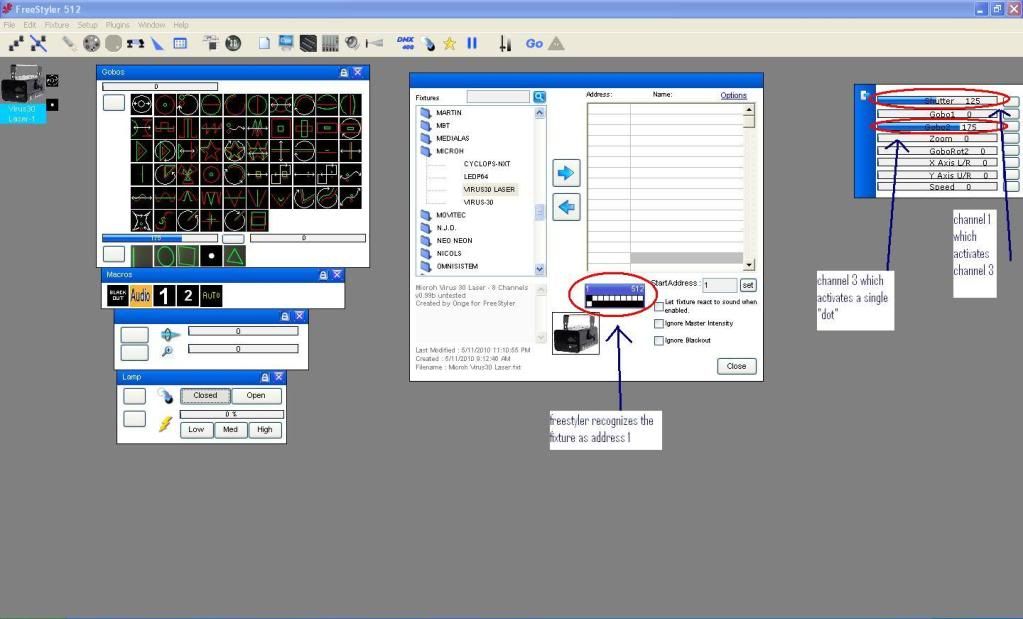
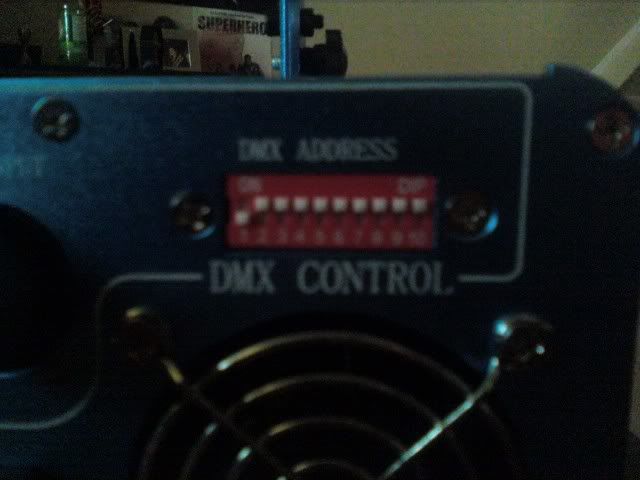
 ... its really fustrating when everything is correct and nothing works...