OK heres what you need to do... (from the begining, this is for anyone wanting to use this!)
Open TouchOSCeditor and create the page template as you want it. This can be really time consuming and I am always making changes to my layout. Or download the one I posted on another thread.
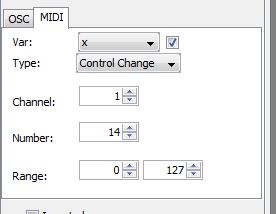
Then edit each button, fader, encoder and assign each with a midi channel value. All you need to do is click on each one in turn and edit the info on the left side of the screen...
You will notice that there is a choice of OSC or MIDI on a little tab. Ignor OSC and click ob the MIDI tab!
- fs3.JPG (16.36 KiB) Viewed 913 times
The only bits you need to change are put a tick in the little box next to the 'x' and the 'NUMBER' for each button or fader etc.
var: X
Type: Control Change
Channel: 1
Number: (this is the variable from 0 to 127 and each bitton, fader needs a unique number)
Range: 0 127
Once you get more into this you might want / need to change some other other stuff but this will be enough for now!
Once you are done save it.
Make sure you have downloaded the TouchOSC bridge and that it is running on your PC. Your PC and iPad MUST MUST be connected to the SAME wifi network.
Now click on the SYNC button on th OSC editor. If you dont do this then you can't connect to your iPad!!!!
- fs4.JPG
- (13.82 KiB) Downloaded 7 times
You need to make sure that the OSC app on the iPad is set up correctly. the IP address of the Host PC MUST be correct.
Connections
OSC: 192.168.1.4 (example)
MIDI Bridge: 192.168.1.4 (example)
MIDI Mobilizer: Disabled
Core MIDI: Disabled
Layout
(Select this and another page will open, there will be some layouts already here but you will want to add your own that you just made, more on this in a bit...)
Options
(various option that you probably wont need but have a look if you like)
About
(The usual 'About'type info)
So the 'Layout' bit. Open this up and at the to you will see 'ADD'. Open this and all being well your iPad will scan the network and find your PC (This only works if you have clicked on 'SYNC' in touchosceditor, you have both devices on the same wifi network and the ip address are correct on the iPad. Once you see your PC on the list (sometimes it might appear twice but it will still work) open that and it will download the layout you just made.
Give yourself a big pat on the back, you little genius!

So now you can go into FS and edit the midi control to match the layout on the ipad.
Just remember that the TouchOSC bridge MUST stay running in order for the layout to communicate with FS.
Ive probably missed out some stuff but this SHOULD get the job done.


