Page 1 of 1
LED Colorful Beam Pinspot
Posted: 25 Dec 2018, 05:54
by dbqtech
I just picked up some of these mini DMX spots.
https://www.ebay.com/itm/292242352439
I have been messing with the figure creator but can't figure out how to get the strobe dimmer and shutter to work right all on the same channel. Any help with creating a fixture file would be greatly appreciated.
Re: LED Colorful Beam Pinspot
Posted: 26 Dec 2018, 15:55
by Laudrin
Hey dbqtech, you can configure your fixture file to have different functions on the same DMX channel. The range of course should not overlap (there are some functions where this is possible).
If you do not manage it by yourself with this information, just post the fixture file here (zip if necessary) so someone can take a look at it and possibly help.
Bye, Laudrin
Re: LED Colorful Beam Pinspot
Posted: 09 Mar 2019, 16:07
by Dj3540
I too have a few of these. Not the brightest but fit my need for effect. I started within fixture creator by starting a 6ch blank custom fixture and saved it. Using the sliders in Freestyler was able to map each channel and functions inside the 0~255 range. The light does function at 95%. My only problem that I have tried and tried to configure is [ch1 dimmer 0~134 value]. When using the ch1 value range [0~134] the channels 2,3,4 and 5 all move from 0~255 simultaneously producing a white light. I would like to use ch1 slider [0~134] to dim current output color spectrum other than RGBW. Attached is the fixture profile and manual. Thank you.
Re: LED Colorful Beam Pinspot
Posted: 19 Jun 2022, 01:06
by carnevale
Did you create the driver for this one ?
Re: LED Colorful Beam Pinspot
Posted: 14 Dec 2022, 17:10
by Dj3540
Yes I did in fixture creator. For some reason this pinspot is giving me issues now. Some how my current profile on computer is different than the included image above...going to jump in and change it to what the photo shows. Currently when the light turns on its stuck in strobe mode
Re: LED Colorful Beam Pinspot
Posted: 25 Apr 2023, 06:35
by Olivemx
Bonjour, J'ai acheté ces mêmes lumières "RGBW Spot Light" sur AliExpress et je rame pour faire les macros... est-ce que quelqu'un aurait le fichier pilote ?
Merci, beaucoup !
Re: LED Colorful Beam Pinspot
Posted: 20 Dec 2025, 09:58
by DreNL
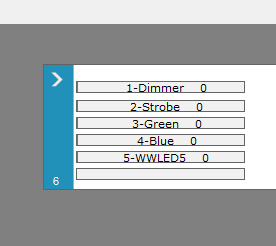
I also have issues with this pinspot. Attached the file. Issue is that if I use DMX channel 1 for the strobe AND the RGBW intensity, the sliders don't accept that. See the screenshot. The only thing I can think of is to make a custom slider with 3 parts like I did for channel 6. Please share your ideas.
- Sliders.png (6.04 KiB) Viewed 35600 times
Re: LED Colorful Beam Pinspot
Posted: 20 Dec 2025, 15:33
by Rod_Horning
I created a fixture in which Channel 1 was defined both as the dimming channel and the strobe channel - specifying 0 to 135 as the dimming range and 136 to 240 as the strobe range. As DreNL found, the channel 1 slider (upper right hand corner) only varies the DMX values from 0 to 135.
The "solutions" of which I can think of are:
- do not define channel 1 except to label and then, as DreNL suggests, define 2 or 3 custom sliders
- define channel 1 as both the dimming and strobe channel with dimming set 0 to 135 and strobe defined as 0 off, slow 136 and fast as 240. When the instrument is selected, click on Window -> All to open the helpful programming windows. The sliders in these windows work as correctly.
Re: LED Colorful Beam Pinspot
Posted: 20 Dec 2025, 19:40
by DreNL
Thanks for answering and checking Rod. The only thing I could come up with is the added fxt. Channel 1 and channel 6 are added as custom sliders. In the program you will see still the 6 sliders, it will run now from 0 to 255. So you can use the one slider. You can also use the windows -> all to see all 20 custom sliders to funetune the output of DMX. Check it out.
Re: LED Colorful Beam Pinspot
Posted: 20 Dec 2025, 22:00
by Rod_Horning
Your solution works fine.
I've attached a slightly updated fixture that defines channel 1 as both the dimmer and strobe channel. This allows the use of the dimmer/strobe window if that would be helpful to you. (You could remove the custom sliders that provide this function but that is not necessary).
FYI. The Fixture creator has an EXPORT function that we recommend you use. The fixture definition is condensed similar to a ZIP file and the fixture picture is included in the EXPORTed file and is a permitted attachment file type.
Re: LED Colorful Beam Pinspot
Posted: 21 Dec 2025, 12:33
by DreNL
I know Rod, Just forgot. Been a couple of years since I have used fS. As I was asked to do light for a band i got back into the saddle. Next time I will export mate. Will test your fixture and leave comment soon.
Edit: Tested and working like a charm.
Happy with it. Thanks Rod.
