Page 1 of 1
No fogger / hazer control window
Posted: 15 May 2013, 18:57
by Pidea
I've created a fixture file for a QTX Light FX1000 hazer. It's a pretty standard 2 channel hazer and I followed the instructions in the Wiki on how to do it to the letter.
But, oddly, when I click on the Window menu and select 'Special' nothing appears. Same if I click on Window - All, nothing.
I can't see how to get the fogger / hazer control window to come up. Anyone else getting this ?
TIA
Re: No fogger / hazer control window
Posted: 15 May 2013, 22:24
by dmxlighting
Not really sure what u mean.
If you made the fixture profile and then imported it onto ur fs desktop,
when u then select the fixture and open up the slider at the right of the screen are u able to control the hazer?
Re: No fogger / hazer control window
Posted: 15 May 2013, 22:31
by Pidea
Hi thanks for the reply - yes, I can control it directly. What I can't find anywhere is this:
http://www.freestylersupport.com/wiki/f ... :fog_panel
Re: No fogger / hazer control window
Posted: 15 May 2013, 23:58
by Nathanrs93
It should work if the fixture is done correctly, surely? Pidea, upload the fixture and see if we can work it out.
/Nathan
Re: No fogger / hazer control window
Posted: 16 May 2013, 00:05
by Pidea
That's what I thought !
Anyway, I've attached the fixture file. It's for a QTXLight FX1000 Hazer:
http://www.mixdirect.co.uk/qtx-light-hazer-fx1000.html
Manual here:
http://cdn.avslgroup.com/manuals/100/160451.pdf
Cheers
Phil
Re: No fogger / hazer control window
Posted: 16 May 2013, 00:17
by Nathanrs93
Phil
Try click this icon instead and see if the window comes up then...
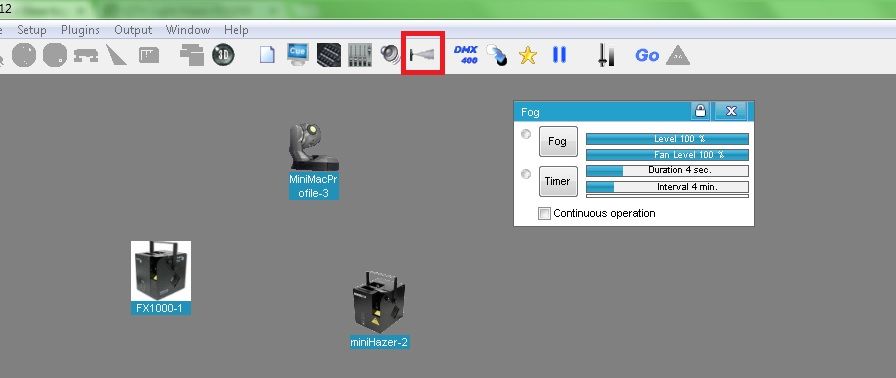
/Nathan
Re: No fogger / hazer control window
Posted: 16 May 2013, 00:22
by Pidea
Aha ! That's done it - thanks. I knew I was being dull. Mind you, it doesn't make sense that you can't get to it from the Window menu ....
Thanks
