Page 1 of 1
Color line over fixture image
Posted: 28 Nov 2009, 21:10
by claudegu
Hello,
I have created a fixture with only 3 chanels for R G B and it works great with a color line over the fixture wich change on the R G B values. Is it possible to have a square with the color and not a line?
Claude
Re: Color line over fixture image
Posted: 28 Nov 2009, 21:48
by remco_k
Never searched for it. I think there is no option for that.
Re: Color line over fixture image
Posted: 29 Nov 2009, 09:18
by claudegu
Hi remco_k,
Many thanks for your answer.
Claude
Re: Color line over fixture image
Posted: 29 Nov 2009, 09:35
by LJ_krede.dk
The colorline (red on picture) is shown when the fixture uses RGB or CMY color mixing
if you have a colorwheel (or have made colorwheel settings for your fixture. some RGB fixtures has a channel with color presets) you see a square (yellow on picture) at your fixture.
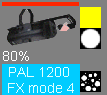
- PAL1200FX.png (4.98 KiB) Viewed 548 times
in this case my fixture has two gobo wheels which is also shown at the fixture. (gobowheel 1 is open, gobowheel 2 is beam splitter)
OBS: it is for demonstration only that I have selected a color at the CMY and Colorwheel channels at the same time. it is not a thing I would normally do.
Re: Color line over fixture image
Posted: 29 Nov 2009, 16:39
by claudegu
Hi LJ_krede.dk
Thanks for the example. My device is a leds panel so I have only the colorline and sometimes the color is a bit difficult to see correctly.
But it is OK freestyler has so many features, that I always want one more

Claude