
This is an old revision of the document!

Sliders
Here we will discuss the easiest way to operate / control a fixture in Freestyler. With FS open and no fixtures selected you will notice this icon on the righthand side of the FS desktop. This is where the 'Sliders', also known as faders, will expand from. No with no fixture selected, run the mouse cursor over this icon and… nothing will happen.

Now asuming that you have selected and added one or more fixtures to your FS desktop, select one or more of the SAME type of fixture by click ing on it / them. Please be careful not to select a mix of different fixtures at this stage. If a mixture of fixtures is selected then the sliders will only show the attributes for the first fixture selected. Now with fixture(s) selected run the mouse cursor over the slider icon and something like this will appear…
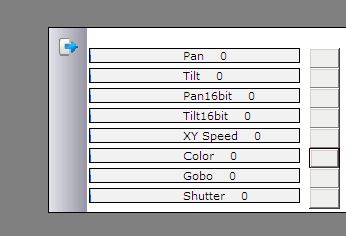
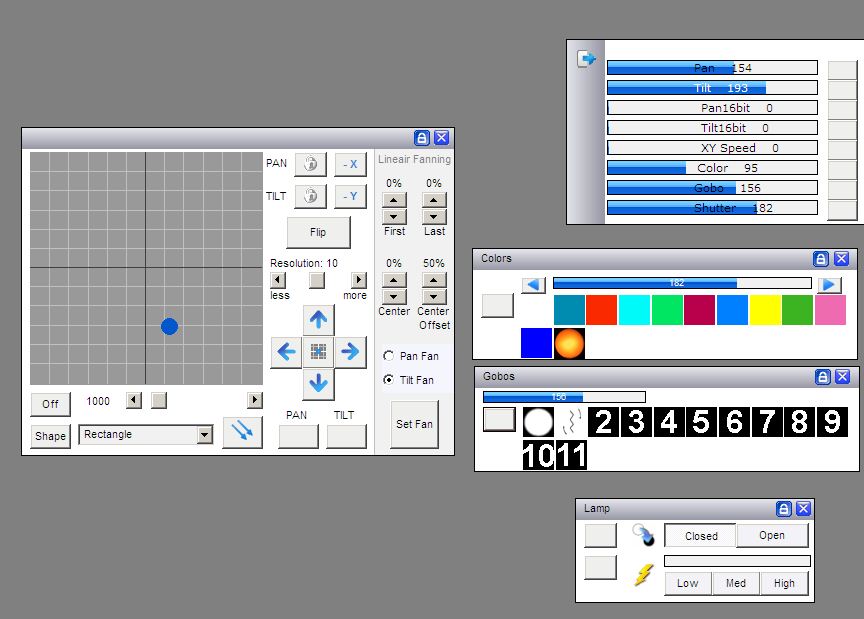
Now you can move the slider for each attribute of the fixture simply by moving the mouse cursor onto a slider and then by holding down the left mouse button move the left and right until you get the desired dmx values. As an alternative to this method and as show below you can open up all the fixtures attribute windows and as you adjust the colour wheel, it will show the value on the slider.
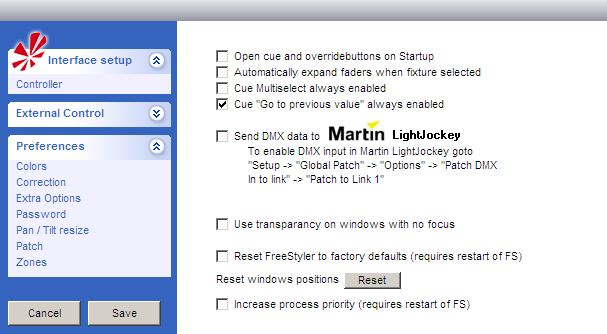
It is possible to have the sliders expand automaticaly as soon as a fixture is selected. This is a option and to switch this feature on you need to navigate to here →
Setup > Freestyler Setup > Preferences > Extra Options
Here you will find a set of tick boxes. The second one down is 'Automactically Expand Faders When Fixture Selected' The other features in this window will be discussed in other documents in the future.
I would encourage you to play with this feature and fully familiarize your self with it. However I would not recommend using this as a way of controlling lighting on a live show.
I should also mention that you will not see the sliders move when sequences are played back from cues and submasters. You CAN see the sliders move if you play a sequence from the 'create sequence' window.